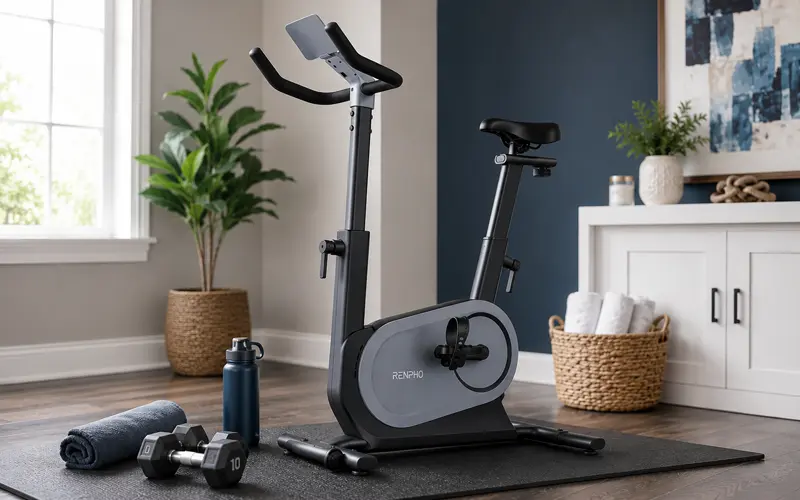
I never considered myself a cyclist. I had taken one spin class in my life, and while I regularly worked out, stationary cycling was never something I was particularly drawn to. That changed when I started using the RENPHO AI Smart Bike.
Like many people, I shifted from going to the gym to exercising at home in 2020. I was already using Les Mills On Demand for my home workouts, but I wanted another cardio option that would give me something different to do. When I was given the opportunity to try the RENPHO AI Smart Bike, I was curious to see whether indoor cycling would be something I enjoyed.
It turned out to be much more than another piece of workout equipment. The bike introduced me to indoor cycling, and within a couple of months, I enjoyed riding enough that I purchased a Peloton Bike.
Setting Up the RENPHO AI Smart Bike
My first experience with the RENPHO bike was positive before I even got on it. I was told shipping could take up to two weeks, so I was surprised when the large box appeared on my front porch about a week later.
Assembly was relatively straightforward and didn’t require a collection of additional tools. The main assembly involved attaching the front and back stabilizers, handlebars, and pedals. Once everything was together, I noticed that the handlebars appeared slightly crooked and my seat needed to be centered. I used my own wrench to loosen the seat bolts and make the adjustment, which only took a few minutes.
Neither issue affected my ability to use the bike, but they were worth noting as part of the setup experience.
What Is the RENPHO AI Smart Bike Like to Ride?
The bike itself is one of the things I have very few complaints about. It feels sturdy while riding, operates quietly, and has a smooth feel. The front wheels also make it relatively easy to move, which is useful when your bike shares space with other equipment in a workout room or home gym because the bike doesn’t necessarily have to remain in the middle of the room when it isn’t being used.
One of the biggest surprises for me has been how much I enjoy riding it. I’m not replacing my regular workout routine with cycling. Instead, the bike gives me another form of cardio that I can add whenever I want something different. There are plenty of evenings when I finish work and decide to get on the bike for an additional ride simply because I enjoy doing it.
RENPHO AI Smart Bike Features
The RENPHO isn’t simply a stationary bike with Bluetooth added to it. Several smart features change how the bike responds during a workout and gives me multiple ways to use it.
Some of the features include:
- 80 resistance levels: Resistance adjusts in half-level increments from 0 to 40.
- Automatic resistance: Compatible workouts can automatically control the bike’s resistance.
- Bluetooth connectivity: The bike connects with the AI Gym app and supports third-party fitness apps.
- Workout metrics: I can monitor cadence, resistance, power output, workout time, and other ride information.
- Adjustable setup: The seat and handlebars can be adjusted to create a more comfortable riding position.
- Personalized workouts: The AI Gym app can use fitness information to create training recommendations.
- Workout history: Completed rides and exercise reports are available through the app.
The automatic resistance is one of the more interesting smart-bike features because I don’t have to continually think about changing resistance during a compatible workout. I can concentrate on riding while the bike makes the adjustments.
RENPHO also designed the bike to communicate with third-party platforms through Bluetooth, including Zwift and the Peloton App. RENPHO’s third-party app information explains how those connections work.
Using the RENPHO AI Gym App
The RENPHO AI Gym app is free to use with the bike and offers several different ways to ride. The AI Gym portion begins with an assessment that helps determine fitness level. From there, the app can create a customized training plan and recommend workouts.
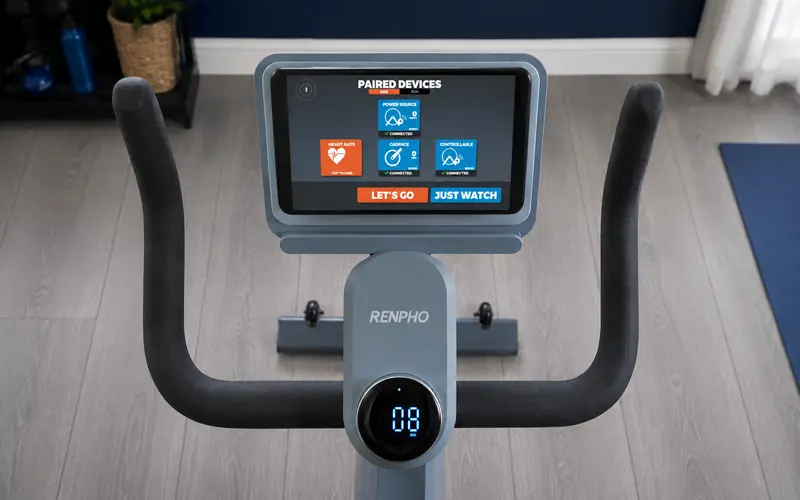
I like the concept because having a program based on your ability gives you some direction instead of simply getting on the bike and wondering what you should do. Where the app falls short for me is the instructor-led portion.
Video Courses
The Video Courses include instructor-led workouts, but the overall experience feels fairly basic. There isn’t much visual variety, and I don’t really connect with the instructor style. When I’m following an instructor-led workout, I want someone energetic and engaging who makes me want to keep going.
That preference becomes especially important once I realize how much the instructor and overall class experience affect how much I enjoy indoor cycling.
Challenge Rides and Free Cycle
The Challenge section offers scenic courses where you can ride through different environments and challenge other riders. These are a nice alternative when I want something different from an instructor-led class.
Free Cycle is exactly what it sounds like. There is no instructor or structured course, so I can simply ride at my own pace while viewing my workout metrics. After a ride, I can access an exercise report and review my workout information.
Apple Watch and Workout Tracking
Being able to see my heart rate during exercise is important to me, so I appreciate that the AI Gym app can integrate with my Apple Watch and display my heart rate while I ride.
There is one limitation that bothers me: the RENPHO workout does not automatically log the ride in the Apple Watch Fitness app the way I want it to. I have tried starting a workout manually on my Apple Watch while also using the AI Gym app, but the workout stops. I would like to see tighter integration between the two.
I’m already familiar with RENPHO’s connected fitness products, including its body-composition ecosystem. You can read more about that in my RENPHO Smart Scale and Smart Tape Measure review.
Using the RENPHO AI Smart Bike With the Peloton App
This becomes the most important part of my experience with the RENPHO bike.
Because I’m not particularly impressed with the instructor-led content in the AI Gym app, I start experimenting with third-party fitness apps. My favorite combination becomes the RENPHO AI Smart Bike with the Peloton App.
There is a trade-off. When using most third-party apps, I lose RENPHO’s automatic resistance feature and need to control resistance myself. Zwift is an exception because the RENPHO can communicate resistance changes through a compatible connection.
For me, giving up automatic resistance is worth it. I enjoy the Peloton instructors and classes considerably more than the classes available through RENPHO. The workouts are more engaging, and I find myself wanting to get back on the bike, which is something I didn’t expect at all.
The Bike That Got Me Into Indoor Cycling
When I started using the RENPHO AI Smart Bike, I was a complete indoor-cycling novice. I wasn’t someone who loved riding bicycles, and I certainly wasn’t shopping for a premium exercise bike. After using the RENPHO for roughly two months, that changed.
The RENPHO itself works well for me. I don’t experience mechanical problems or significant connectivity issues while using it. My biggest criticism is the AI Gym app, which feels much more basic than the bike itself deserves. At the same time, that weakness is also what led me to try the Peloton App.
Once I combined the RENPHO bike with Peloton classes, I realized how much I enjoy indoor cycling when I have instructors and workouts that keep me engaged. In December 2020, I decided to purchase a Peloton Bike.
RENPHO AI Smart Bike: What Stands Out to Me
After spending time with the bike, these are the parts of the experience that stand out most:
| What I Like | What I Don’t Like |
|---|---|
| Smooth, quiet ride | AI Gym app feels basic |
| Sturdy construction | Limited instructor appeal for me |
| Wide resistance range | Apple Watch workout logging is limited |
| Automatic resistance with compatible workouts | Auto-resistance isn’t available with every third-party app |
| Bluetooth connectivity | Minor handlebar and seat alignment adjustments after assembly |
| Third-party app compatibility | |
| Easy to move around the room |
The RENPHO AI Smart Bike has a much bigger influence on my fitness routine than I expected when it arrived at my house. I started with almost no experience or interest in cycling, but within a couple of months I discovered a form of exercise I genuinely enjoy enough to invest in a Peloton.
For me, that is probably the most meaningful part of this RENPHO AI Smart Bike review. The bike isn’t simply another piece of home fitness equipment I tested. It is the bike that introduced me to indoor cycling and showed me that finding a type of exercise you genuinely enjoy can make all the difference in wanting to keep doing it.