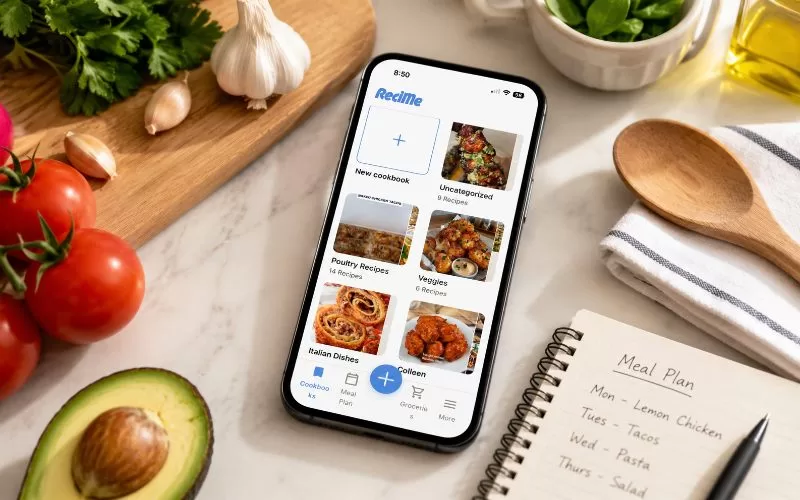
If you love finding new recipes online, chances are you have recipes saved all over the place. That was definitely me.
For years, I have used a broken system. Whenever I found a recipe on Instagram that looked good, I would email it to myself and file it away in a recipe folder. Other recipes ended up buried in Facebook Messenger conversations, browser bookmarks, screenshots on my phone, or saved social media posts. This made finding a recipe like going on a treasure hunt.
I knew I had saved the recipe somewhere, but figuring out where was another story entirely. More often than not, I would spend more time searching for the recipe than I would actually cooking it. Eventually, I realized I didn’t need another place to save recipes—I needed one place to keep them all.
That search led me to ReciMe, and nearly a year later, it has become one of the most-used apps on my phone.
What Is ReciMe?
ReciMe is a recipe-saving and meal-planning app that helps you collect recipes from multiple sources and organize them into your own personal digital cookbook.
Instead of saving links and hoping you remember where they came from, the app imports recipe details and keeps everything together. According to the ReciMe website, users can save recipes from social media platforms, websites, and other online sources while maintaining access to the original creator’s content.
For someone like me who discovers recipes everywhere, that convenience is incredibly valuable.
Why I Started Using ReciMe
I am constantly looking for new meal ideas.
Sometimes I want healthier recipes that fit my nutrition goals. Other times, I am looking for comfort food, quick dinners, or something fun to make on the weekend. The problem was never finding recipes. The internet has no shortage of those.
The problem was remembering where I saved them.
Many of the recipes I collect remind me of meals I already enjoy making at home. If I come across a lighter comfort-food recipe, it often makes me think of my healthy lasagna casserole. If I am researching nutritious ingredients, I may save ideas that complement my article on superfoods that support weight loss and healthy eating.
Before ReciMe, those ideas would eventually disappear into the endless collection of saved content scattered across multiple platforms. Now everything lives in one place.
My Favorite Feature: Importing Recipes From Almost Anywhere
The recipe importing feature is easily the reason I continue paying for the app. Most of the recipes I save come from Instagram and Facebook Reels, but I also save recipes from websites and other online sources. When I find something interesting, I simply share it directly to ReciMe and let the app do the work.

The app typically imports:
- Ingredients
- Instructions
- Recipe details
- Original source information
What I love is that I am no longer saving random links. I am saving actual recipes.
According to information about ReciMe Plus features, premium users can also scan handwritten recipes and cookbook pages. I haven’t personally used that feature, but I can definitely see how it would be useful for preserving family recipes.
Creating a Cookbook That Fits My Lifestyle
Over time, I have organized recipes into categories such as poultry, beef, Mexican, Italian, vegetables, drinks, desserts, and high-protein meals. I even have a category specifically for recipes that fit my nutrition goals but that my husband probably wouldn’t enjoy.
That organization makes meal planning much easier because I can quickly narrow down what I am looking for.
For example, if I need a quick weeknight dinner, I often browse recipes similar to this easy chicken quesadilla dinner. If I am looking for a healthier breakfast or snack option, I might save ideas that fit alongside my pumpkin smoothie made with protein-rich ingredients.
Instead of endlessly scrolling through saved posts, I can jump directly to the category that matches what I am craving.
How I Use ReciMe Each Week
Most weekends, I spend a little time figuring out what sounds good for the upcoming week.
Sometimes I already know exactly what I want to make. Other times I need inspiration, and that’s where ReciMe shines. Instead of starting another internet search, I simply browse recipes I have already collected.
One thing I appreciate about the meal-planning feature is its flexibility.
If I want to add a saved recipe to a specific day, I can. If I already know what I am making and don’t need a recipe, I can simply add a note instead. That may seem like a small detail, but it makes the planner feel practical rather than restrictive.
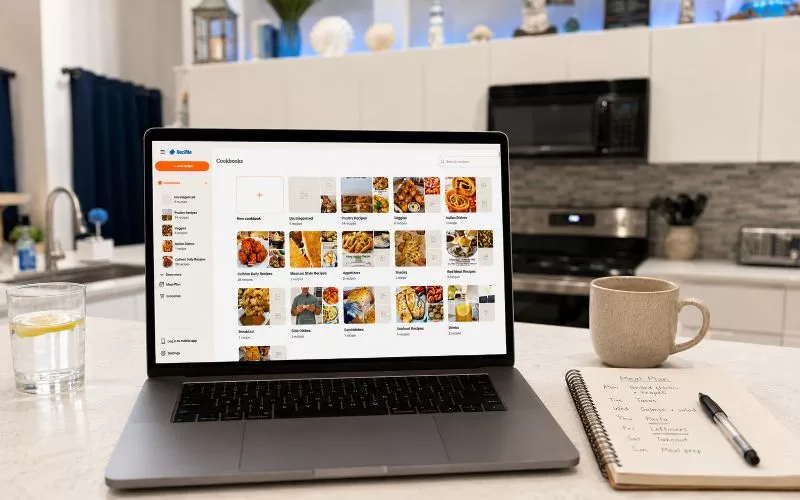
Another feature I use more than I expected is the ability to access my recipes from a computer. By logging into my ReciMe dashboard, I can browse my saved recipes on a larger screen instead of relying only on my phone. As someone whose eyes aren’t getting any younger, I appreciate having the option to view recipes, organize collections, and browse meal ideas from my computer when I don’t feel like squinting at a small screen. The result is that I actually use more of the recipes I save.
Is Recipe Importing Always Perfect?
No, and I think it is important to mention that in my experience, recipes that already include written ingredients and instructions import very accurately. Websites and creators that provide detailed recipe information tend to work well.
Video content can be more challenging.
If a creator flashes ingredients quickly on the screen, skips measurements, or relies entirely on spoken instructions, the import may not always be perfect. The app can only work with the information available in the original content. Fortunately, those situations have been fairly rare for me.
Overall, I have found the imports to be surprisingly accurate, especially compared to the alternative of losing the recipe completely.
What Could Be Better?
My biggest complaint is the subscription model.
I currently use the paid version because I save recipes regularly and get enough value from the app to justify the cost. However, I would personally prefer a one-time purchase option instead of an ongoing subscription.
That said, I use the app often enough that the subscription hasn’t stopped me from continuing my membership. Before upgrading, it may be worth reviewing the features available through the ReciMe subscription plans to determine whether the premium version fits your needs.
I have also never personally used the grocery list feature, so I can’t give a fair review of that aspect of the platform.
Is ReciMe Worth It?
For me, absolutely.
After nearly a year of use and around 100 saved recipes, ReciMe has become part of my weekly routine. It solved a problem that I had struggled with for years and made it easier to actually use the recipes I discovered online. Instead of losing recipes across email folders, Messenger conversations, bookmarks, screenshots, and social media saves, everything is organized in one place. That alone makes it worthwhile.
Final Thoughts
There are plenty of recipe apps available today, but ReciMe stands out because it addresses a problem so many home cooks have created for themselves: saving recipes everywhere.
What started as an attempt to organize my growing collection of recipe links has turned into one of my most-used meal-planning tools. I save several recipes every week, browse them when planning meals, and regularly discover dishes I probably would have forgotten otherwise.
If your phone is filled with screenshots, saved reels, bookmarked recipes, and email folders full of food ideas, ReciMe is worth considering. For me, it transformed a collection of forgotten links into a digital cookbook that I actually use. digital cookbook that I actually use.