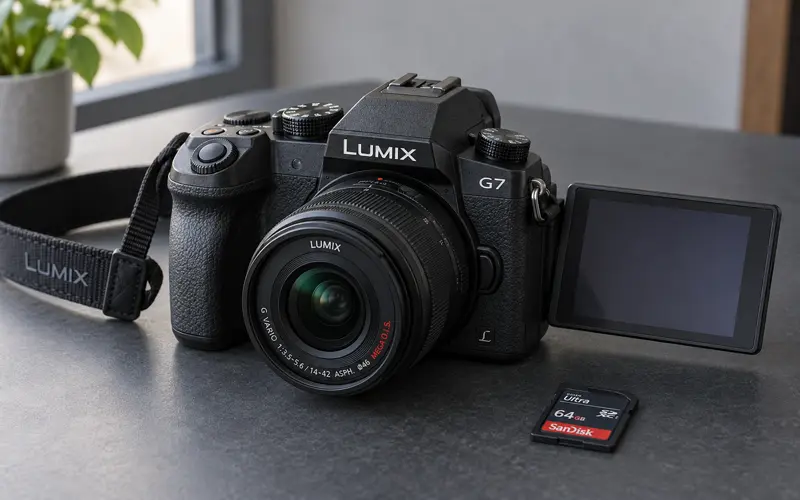
The Panasonic Lumix G7 was my first mirrorless camera, and it quickly showed me why a dedicated camera could be more practical than my heavy DSLR without forcing me to settle for phone-quality photographs. Panasonic provided me with the camera to review, and I used it for family portraits, action shots, outdoor photography, Florida scenery, and 4K video.
What impressed me most was the combination of a lightweight body, interchangeable lenses, physical controls, and 4K Photo modes designed to capture fast movement. Instead of testing the Lumix G7 under controlled conditions, I used it during real family activities—including pool days, a trip to Lion Country Safari, my daughter’s cartwheels, and Halloween portraits.
That firsthand experience allowed me to see where the camera performed well, which features made a meaningful difference, and what practical limitations owners should consider.

Panasonic Lumix G7 Specifications
The Lumix G7 is a Micro Four Thirds mirrorless camera that combines still photography with 4K video and Panasonic’s 4K Photo technology.
| Feature | Panasonic Lumix G7 |
|---|---|
| Camera type | Mirrorless interchangeable-lens camera |
| Sensor | 16-megapixel Micro Four Thirds Live MOS sensor |
| Lens mount | Micro Four Thirds |
| 4K video | UHD 4K at 30 or 24 frames per second |
| Full HD video | Up to 60 frames per second |
| 4K Photo | Approximately 8-megapixel frames captured at 30 frames per second |
| Autofocus | 49-area contrast-detection autofocus with Depth From Defocus technology |
| Screen | Three-inch fully articulating touchscreen |
| Viewfinder | Electronic viewfinder |
| Burst shooting | Up to approximately eight frames per second with focus locked |
| Connectivity | Built-in Wi-Fi |
| Stabilization | No in-body image stabilization |
| Audio | External microphone input |
| Storage | SD, SDHC, or SDXC memory card |
| Weight | Approximately 410 grams with battery and memory card |
Panasonic provides additional specifications, manuals, and operating guides through its official Lumix G7 support page.
Design, Size, and Handling
One of the first things I noticed about the Panasonic Lumix G7 was how light it felt compared with my DSLR. I had often left my larger camera at home because I did not want to carry the extra bulk. The G7 provided interchangeable-lens flexibility in a body that was much easier to bring along for a family outing.
Although the camera is relatively lightweight, it has a pronounced handgrip that made it feel secure and comfortable in my hands. Its design resembles a small DSLR, with a viewfinder, mode dial, drive-mode dial, control wheels, and several physical buttons.
That combination worked well for me as someone transitioning into mirrorless photography. The camera did not feel stripped down, but I also did not have to dig through the menu every time I wanted to make a basic adjustment.
The electronic viewfinder was useful in bright Florida sunlight when the rear screen was more difficult to see. The fully articulating touchscreen could rotate and angle outward, making it helpful when photographing from a high, low, or unusual position.
Controls and Touchscreen
The touch-enabled monitor was one of my favorite everyday features. I could use it to review photographs, move between images, adjust the focus point, navigate settings, and examine footage frame by frame.
This became especially important when using 4K Photo mode. After recording a fast sequence, I could scroll through the individual frames directly on the screen and save the precise moment I wanted as a photograph.
The screen also helped when photographing children because I could concentrate on what they were doing instead of constantly adjusting the camera. It made the G7 feel more approachable without removing the physical controls that experienced photographers often prefer.
Photo Quality
The Lumix G7 uses a 16-megapixel Micro Four Thirds sensor. In good outdoor light, I found the photographs clear, colorful, and noticeably better than the images I typically captured with my phone.
The camera handled several types of photography well during my review:
- Outdoor family portraits
- Children and other moving subjects
- Water splashes and pool activities
- Travel and attraction photography
- Tropical plants and scenery
- Florida sunsets
- Halloween costumes and clothing details
The photograph of my daughter at Lion Country Safari is a good example of its outdoor image quality. The camera retained the color and texture of the plants and moving waterfall while keeping my daughter as the clear subject.
The Micro Four Thirds sensor is smaller than an APS-C or full-frame sensor, so low-light performance and background blur depend heavily on the lens, lighting, and camera settings. However, the smaller sensor also contributes to the compact camera and lens system that made the G7 convenient to carry.
For the bright outdoor conditions in which I used it most often, the camera produced the vibrant color and detail I wanted. Photographs can be refined later with Photoshop CC and Lightroom, but the original image still needs strong color, focus, and composition.
Portrait Photography
I used the Lumix G7 for both posed and spontaneous portraits. One of my favorite examples was a photograph of my daughter wearing her Halloween costume.
Children may be standing still during a portrait, but their expressions continue to change. A natural smile can appear and disappear within a second. I could speak to my daughter while taking the photograph and capture a more genuine expression instead of repeatedly asking her to pose.

The photograph retained the details in her costume, long hair, and decorated trick-or-treat bag while separating her from the background. The result felt like a real family photograph rather than a formal portrait session.
The camera’s touchscreen focus was also helpful for portraits because I could select the part of the scene where I wanted the camera to focus. The fully articulating screen offered additional flexibility when changing the camera angle.
Autofocus and Moving Subjects
The Lumix G7 uses Panasonic’s contrast-detection autofocus system with Depth From Defocus technology. It offers 49 focus areas, face and eye detection, subject tracking, custom multi-area focusing, and touch focus.
For single photographs and predictable family activities, I found the camera responsive enough to capture the moments I wanted. The touchscreen made it easy to identify the subject, while the viewfinder helped me follow outdoor action.
Continuous autofocus is not the camera’s strongest feature compared with systems that use phase-detection autofocus. It may adjust or hunt while tracking unpredictable movement, particularly during video. That makes the G7 better suited to controlled video, predictable action, or manual focus than to demanding professional sports coverage.
For my family photography, 4K Photo mode helped compensate for imperfect timing and unpredictable movement.
How 4K Photo Mode Works
The Lumix G7’s 4K Photo feature was the highlight of my experience. It records a rapid 4K sequence at 30 frames per second and allows an individual frame to be saved as an approximately 8-megapixel photograph.
The camera provides different ways to use the feature:
- 4K Burst: Records while the shutter button remains pressed.
- 4K Burst Start/Stop: Begins recording with one press and stops with another.
- 4K Pre-Burst: Captures frames from immediately before and after the shutter is pressed.
Instead of trying to press the shutter at the exact fraction of a second when something happened, I could capture the complete movement and select the best frame afterward.
This was particularly useful when photographing:
- Jumps and cannonballs
- Water splashes
- Cartwheels and tumbling
- Children playing sports
- Animals in motion
- Rapidly changing facial expressions
The tradeoff is resolution. A standard photograph from the G7 uses the full 16-megapixel sensor resolution, while a photograph extracted from a 4K sequence is approximately 8 megapixels. For large prints or heavy cropping, a full-resolution photograph is preferable. When capturing the right instant matters most, the 4K frame can be more useful.
My Cannonball Test
I tested 4K Photo mode while my son performed a cannonball into our pool. A jump like this happens too quickly for me to depend entirely on perfect shutter timing.
I recorded the movement and then reviewed it on the touchscreen one frame at a time. I was able to select an image of him suspended above the pool with his knees tucked toward his chest.

The video demonstrates how brief the ideal moment was. The selected frame preserved his position in midair without requiring several attempts to time the photograph.
The landing produced another difficult subject: a large splash with water moving in every direction. The extracted frame captured the shape of the splash and many individual droplets.

4K Video Quality
In addition to its 4K Photo modes, the Panasonic Lumix G7 records UHD 4K video at 30 or 24 frames per second. It can also record Full HD video at up to 60 frames per second.
The combination of 4K recording, a fully articulating screen, manual exposure controls, focus peaking, and an external microphone input gives the camera useful video capabilities beyond basic family clips.
The screen can face forward, which is helpful when someone needs to see the framing while standing in front of the camera. The microphone input allows better audio than the built-in microphone when an appropriate external microphone is attached.
The G7 does not include in-body image stabilization. Handheld video therefore benefits from a stabilized lens, tripod, monopod, or gimbal. Panasonic lenses marked with optical image stabilization can help reduce camera shake, but stabilization depends on the lens being used.
For stationary filming, family videos, interviews, and planned creative projects, the camera provides a strong set of video tools. Fast subjects requiring dependable continuous autofocus may require more careful setup.
Lens Options
The Lumix G7 uses the Micro Four Thirds lens mount, which provides access to compatible lenses from Panasonic, Olympus, and other manufacturers.
My experience with the original lens made me want to purchase additional lenses so I could expand the types of photographs I captured. Lens choice can make an enormous difference in the camera’s results.
Depending on the subject, an owner might choose:
- A compact zoom lens for travel and everyday photography
- A telephoto lens for wildlife or sports
- A wide-angle lens for landscapes and interiors
- A bright prime lens for portraits and lower-light photography
- A macro lens for close-up details
Because the camera lacks in-body stabilization, a lens with optical stabilization can be particularly useful for handheld photographs and video.
Battery Life
Battery life was the most noticeable practical limitation during my review. I brought the Lumix G7 to Lion Country Safari intending to photograph my family, the animals, and the park’s water activities.
South Florida lightning caused the water area to close, and my camera battery eventually died before I finished taking all the photographs I had planned. I had meant to charge it fully before leaving but forgot.
Recording 4K footage, reviewing sequences, and using the electronic screen can consume more power than occasional standard photographs. For a full day of photography, I would consider the following essential:
- Begin with a fully charged battery.
- Carry at least one charged backup battery.
- Turn off Wi-Fi when it is not needed.
- Avoid repeatedly reviewing long sequences when power is limited.
- Keep batteries protected from excessive Florida heat.
Panasonic identifies the DMW-BLC12PP as the compatible battery and lists an approximate charging time of 140 minutes. My experience made a backup battery one of the first accessories I would recommend.
Wi-Fi and Sharing
The Lumix G7 includes built-in Wi-Fi for connecting the camera to a compatible smartphone. Through Panasonic’s image application, photographs can be transferred for sharing without first removing the memory card.
This was a useful convenience because I enjoyed sharing photographs with friends and family. A dedicated camera may produce better images than a phone, but wireless transfer reduces the inconvenience of moving those images before posting or sending them.
The camera can also support remote operation through a connected device, which can be helpful for group photographs, tripod photography, or situations in which touching the camera could disturb the composition.
Photographing Florida Scenery
The Lumix G7 was not limited to portraits and movement. My daughter noticed a beautiful sunset one evening, and I stepped onto the back porch to photograph it.
The resulting image captured two palm trees silhouetted against a pink and lavender sky.

This photograph demonstrated the camera’s versatility. The pool aimage tested speed, while the sunset relied on color, exposure, and composition. The camera was light enough to keep nearby and capable enough to photograph the scene when it appeared.
That portability would also make it convenient when visiting scenic places to take pictures in Miami or carrying a camera throughout a full day of sightseeing.
Panasonic Lumix G7 Strengths and Limitations
| Strengths | Limitations |
|---|---|
| Lightweight and comfortable to carry | No in-body image stabilization |
| Clear outdoor photo quality | Stabilized lenses are preferable for handheld video |
| Useful 4K Photo modes | Extracted 4K photographs are approximately 8 megapixels |
| UHD 4K video recording | Continuous autofocus can hunt during video |
| Fully articulating touchscreen | Battery can drain quickly with frequent 4K use |
| Electronic viewfinder | Body is not weather-sealed |
| External microphone input | No headphone output for monitoring audio |
| Wide selection of Micro Four Thirds lenses | Smaller sensor has limits in very low light |
| Physical dials and customizable controls | Plastic construction may feel less premium |
| Built-in Wi-Fi | A backup battery adds to the overall cost |
Who Is the Panasonic Lumix G7 Best For?
Based on its design and features, the Lumix G7 is particularly well suited to:
- Beginners moving beyond smartphone photography
- Families wanting better photographs and video
- Bloggers and content creators
- Travelers who want interchangeable lenses without a heavy camera
- Anyone interested in learning manual photography controls
- Video creators who typically use a tripod or stabilized lens
- Photographers who want an entry into the Micro Four Thirds system
- Parents who frequently photograph active children
It is less suited to someone who requires advanced continuous autofocus, in-body stabilization, weather sealing, professional low-light performance, or extensive audio-monitoring controls.
My Overall Panasonic Lumix G7 Review
The Panasonic Lumix G7 gave me the image quality and creative flexibility I wanted without the bulk that often discouraged me from carrying my DSLR. I genuinely liked its comfortable grip, physical controls, articulating touchscreen, 4K video, and interchangeable-lens system.
Its standout feature for me was 4K Photo mode. Being able to record movement and choose the strongest frame afterward made it much easier to photograph cannonballs, water splashes, cartwheels, and natural expressions. Those were not staged camera tests; they were real family moments I wanted to preserve.
The camera does have limitations. It lacks in-body stabilization and weather sealing, continuous video autofocus is not its greatest strength, and frequent 4K use makes an extra battery important. Extracted 4K photographs also have less resolution than standard still images.
Even with those considerations, I found the Lumix G7 approachable, versatile, and enjoyable to use. It encouraged me to carry a dedicated camera more often, experiment with action photography, and capture family memories that would have been difficult to preserve with perfect timing alone.